Drive Smarter
- 4.7
- Rating
- 100.00K
- Installs
- Free
- Price

 Analysis by App-foxy
I approached Drive Smarter as someone who wanted a clearer way to work with a compatible dash cam, not as someone looking for another general navigation app. That distinction matters from the first screen. This is a free Maps & Navigation app from Cedar Electronics, built as an in-car companion for select Cobra and Escort Dash Cams. Its usefulness depends on having supported hardware, so the right question is not whether it can replace every driving app on your phone. The better question is whether it makes owning one of those dash cams less awkward.
My overall impression is positive. The app gives a connected place for the dash-cam experience instead of leaving the camera, phone, and saved recordings feeling like separate pieces of equipment. It is aimed at everyday drivers who want a smoother routine around their camera, especially when they need to check footage or manage the device without repeatedly reaching for controls on the camera itself. With an average rating of 4.6 from around 12 thousand ratings and more than 100 thousand installs, it has clearly found an audience.
Still, I would not install it expecting a universal driving assistant. It is not the best choice if you only want live traffic directions, public transport planning, or a map that works independently of special hardware. The app makes the most sense when your car already includes a compatible Cobra or Escort Dash Cam and you want the phone to become a practical extension of it.
You May Also Like

 Blood Strike: 2.5 Anniversary
Blood Strike’s Loadouts Turn Every Drop Into a Tactical Gamble
A close look at Blood Strike’s custom loadouts: how fast access to signature weapons reshapes its battle royale rhythm, rewards preparation, and narrows the gap between fights.

 Pandora - Music & Podcasts
Pandora’s Music Is Easy to Start, but Harder to Recover
Pandora’s strength is its low-effort path from a seed to a station. Its weak spot is how much confidence it asks you to place in connection, setup, and quiet recovery.

 8 Ball Pool
 Is Built on Rivalries, Rematches, and Routine
A close look at the rivalries, rematches, shared routines, and unanswered safety questions that turn a quick pool match into a persistent mobile community.

 Samsung Music
’s Quiet Strength Is Playing What You Already Own
Its reach comes less from spectacle than from dependable access to a personal library. That simplicity is both the app’s strongest retention engine and its ceiling.

 AccuWeather: Weather Radar
AccuWeather Review: A Quick, Clear Forecast for Everyday Decisions
For everyday plans, the best forecast is the one you can understand quickly. AccuWeather makes rain timing, radar, and local conditions easy to act on, with a few trade-offs.

 Hill Climb Racing
Why Hill Climb Racing Still Turns Crashes Into One More Run
A tiny car, a bumpy hill and one more upgrade: Hill Climb Racing keeps resurfacing because its simple chaos makes every near-miss feel personal.
More From Our News Desk



What the app is really for
The first thing to understand is the relationship between the app and the camera. Drive Smarter is not valuable in isolation in the way a standalone map, parking app, or route planner can be. Its central job is to support a connected dash-cam workflow. That means the quality of the experience is shaped by the camera model, the way you mount and power the camera, and how often you actually review recordings.
For a first-time user, this is reassuring rather than limiting. You do not need to learn a complicated navigation system with layers of unrelated tools. Instead, you can focus on a small set of driving tasks: connecting the app to the supported camera, checking whether the connection is working, and using the phone when the camera produces footage you want to inspect or keep. That narrower purpose makes the app easier to understand once the initial pairing is complete.
I also like that the app is free to install. That lowers the barrier for someone who has just bought a compatible camera and wants to see whether the companion experience is worthwhile. There are in-app purchases ranging from $4.99 to $49.99 per item, so “free” should be read as the entry point, not as a promise that every possible function or service is included without charge. I would check the purchase screen carefully before confirming anything and decide whether an optional feature genuinely fits the way you drive.
The age rating is Everyone, which matches the straightforward nature of the app. It is a practical utility rather than a social network or entertainment product. The current version is 4.9.1.0, and the app runs on devices using Android 9 or later. That operating-system requirement is worth checking before installation, particularly if you keep an older phone in the car as a dedicated device.
Before installing, check the hardware relationship
The most useful preparation is to identify the exact dash-cam model you own and confirm that it belongs to the supported Cobra or Escort range. Do this before spending time troubleshooting. A phone can have a strong internet connection and still fail to provide a useful experience if the camera itself is outside the app’s supported family.
I would also decide which phone will be your regular companion device. Switching between several phones can make a simple setup feel unnecessarily mysterious, especially if one phone is used for daily driving and another is left in the vehicle. Choosing one main device gives you a consistent place to open the app, review footage, and handle any connection prompts.
Another practical tip is to perform the first setup while parked. It sounds obvious, but connected car equipment often invites people to experiment at a traffic light or while pulling away. Pairing, checking menus, and learning where recordings appear are tasks for the driveway, not the road. Once the routine is familiar, you can keep interactions brief and safe.
The first setup should be treated as a short checklist
After installing Drive Smarter, open it with the vehicle stationary and keep the dash cam powered. The important goal is not to explore every screen immediately. It is to establish a working relationship between the app and the camera. If the app asks you to select or identify the relevant device, take a moment to choose the correct model rather than guessing.
Keep the camera close enough for a dependable initial connection and avoid turning the car off halfway through the process. If the connection does not succeed on the first attempt, I would close the app, restart the camera’s power cycle, and try again before changing multiple phone settings at once. Changing several things together makes it difficult to know which action solved the problem.
This is one of the less obvious lessons with companion apps: the first successful connection is more important than a perfect first tour. Once the app recognizes the camera, you have a reference point. You can then learn the remaining controls one at a time instead of wondering whether every problem comes from the phone, the camera, or the setup itself.
It is also sensible to keep the phone’s storage situation in mind. Dash-cam footage can become large and easy to accumulate. Even if the app makes reviewing recordings convenient, convenience can encourage you to keep everything. I recommend deciding in advance what deserves permanent storage: an incident, an unusual road event, or a clip you need to share. Routine footage should not be treated as an archive by default.
Your first meaningful success
The first real test should be simple: connect to the camera, locate a recent recording, and confirm that you can understand what you are seeing. That gives you a much better measure of success than merely reaching the home screen. If you can open a recent clip and identify how you would handle it later, the app has already become useful.
For example, imagine finishing a normal commute and noticing that another driver made a sudden move near your car. You are parked at home, so you open Drive Smarter, connect to the dash cam, and look for the relevant recording. The useful workflow is not just watching the clip. It is knowing whether the footage is clear enough to matter, deciding whether it needs to be retained, and avoiding unnecessary searching through every file on the camera.
That is where a connected app can be more comfortable than relying only on the camera’s physical controls. A dash cam mounted behind the windshield is not always pleasant to operate directly. The phone gives you a larger, more familiar interface for the review stage. I would still avoid using it while driving; the app should support your driving routine, not compete with your attention.
A second good test is to repeat the connection later, after leaving the car and returning. If the process feels understandable on the second visit, you are past the most important learning curve. If it feels different every time, write down the sequence that worked during setup. A tiny personal checklist can prevent a lot of frustration when you need a recording quickly.
Where first-time users can get confused
The biggest source of confusion is assuming that the app behaves like a general-purpose navigation tool because it appears in the Maps & Navigation category. It does not replace the route guidance you normally use for finding addresses, comparing travel times, or checking traffic. If you install it for those purposes, you may think it is missing something when the real issue is that you expected the wrong kind of app.
A second misunderstanding concerns the word “connected.” A phone may be online while the camera is not properly available to the app. Those are separate parts of the setup. If the app cannot work with the camera, repeatedly checking the phone’s internet connection may not solve the actual problem. I would first confirm that the camera is powered, that you selected the correct supported device, and that the phone is close enough for the connection process.
There is also a difference between viewing a recording and managing it responsibly. Finding a clip does not automatically mean it is safe to delete the rest or that the clip has been copied somewhere you can rely on. Before removing anything, I would make sure the important recording is stored in the place I intend to use later. This is especially important after a stressful incident, when it is easy to act quickly and regret it.
In-app purchases can create another moment of hesitation. Because the app is free to download, a new user may assume every capability is included. The purchase range tells you that optional paid items exist, but it does not mean you must buy something to understand the basic companion workflow. I would use the free starting experience first, then examine each paid option in terms of a specific need rather than purchasing simply because it appears in the app.
Finally, do not judge the app solely by a connection problem on an older phone. Android 9 is the minimum operating system, and a device that technically meets that requirement may still feel less comfortable in a car than a newer phone. A small screen, limited storage, or an unreliable battery can make the overall experience seem worse than the app itself.
How I would build a dependable everyday routine
Once the first connection works, I would keep the routine deliberately boring. Open the app when parked, connect to the dash cam, review only the footage that matters, and leave the rest alone. The less you turn the app into a constant dashboard, the more useful it becomes as a tool for specific moments.
One practical habit is to review footage soon after an unusual event rather than waiting weeks. You are more likely to remember the approximate time and location, which makes the search less frustrating. If the recording is important, label or store it according to your own system outside the immediate camera workflow. The app can help you reach the footage, but your long-term organization should not depend on remembering where every clip was created.
A second habit is to test the app before you need it. Do a short parked check after installation and another check after any major phone or camera change. This is a non-obvious advantage of treating the app like safety equipment: a calm test reveals connection problems before an urgent situation does. It also helps you remember the steps without having to learn them under pressure.
I would keep the phone mounted or positioned safely only if that arrangement does not obstruct the view or invite interaction while moving. Drive Smarter is most useful before and after a journey. During the journey, the dash cam should do its job while your attention stays on the road. That trade-off is important: an app designed to make camera ownership easier should not become another source of distracted driving.
When another option is the better choice
If your main need is turn-by-turn directions, a dedicated navigation app is the better choice. Those apps are built around addresses, routes, traffic conditions, and arrival times, while Drive Smarter is centered on supported dash-cam ownership. Using one as a replacement for the other would be like using a camera viewer to plan a holiday route: possible to open on the same phone, but not the right tool for the job.
If you do not own a compatible Cobra or Escort Dash Cam, I would skip this app. Its value is tied to that hardware relationship, so installing it without the device gives you little reason to keep it. A universal dash-cam app may suit you better if your camera comes from another manufacturer or if you want a solution that works across several brands.
I would also look elsewhere if your priority is a highly automated cloud archive or a broad driving-information service. Drive Smarter is more focused. That focus can be a strength for owners of the supported cameras, because the app does not need to become a huge collection of unrelated tools. But drivers wanting one app for navigation, parking, fuel, traffic, and camera management may prefer a broader combination of services.
On the other hand, if you already have the right camera and find its physical controls inconvenient, this is exactly the situation in which the app earns its place. The phone-based review process can be more approachable than trying to inspect footage through a small camera interface. The decision comes down to whether you want a companion for a specific device or a standalone driving platform.
My recommendation for a first-time owner
I would recommend starting with one clear objective: make sure you can connect and find a recent recording while parked. Do not begin by trying to master every setting or by assuming the app must replace your usual navigation tools. That first successful action tells you whether the basic relationship between your phone and camera is working.
After that, learn your own storage and review routine. Know what you keep, what you can discard, and where an important clip should go. This is more valuable than memorizing every screen because it prepares you for the moment when footage actually matters. It also prevents the camera’s storage from becoming a confusing pile of old recordings.
My final view is that Drive Smarter is a focused, sensible companion app rather than an all-purpose driving solution. Cedar Electronics has positioned it for people using select Cobra and Escort Dash Cams, and that narrow purpose is both its main strength and its main limitation. It is free to begin, rated for Everyone, and available in a current 4.9.1.0 release for Android 9 and newer devices, with optional purchases that should be considered carefully.
If you own compatible hardware, the app is worth trying because it can turn dash-cam footage from an awkward afterthought into a manageable part of your driving routine. If you only want maps or directions, choose a conventional navigation app instead. For the right owner, though, the path from installation to useful footage is straightforward: set it up while parked, confirm one recording, establish a storage habit, and use the app when it genuinely helps rather than keeping it active as another distraction.
FAQs for Drive Smarter
01What is Drive Smarter, and what does it do?
Drive Smarter is a comprehensive app designed to enhance your driving experience by offering real-time alerts, traffic updates, and safety features. It connects to your vehicle to provide insights into driving habits and vehicle health, helping you drive more efficiently and safely. It's a must-have for anyone looking to optimize their daily commute or road trips.
02Is Drive Smarter compatible with all vehicles?
Drive Smarter is compatible with most vehicles manufactured after 1996 that have an OBD-II port. However, it's always best to check the app's compatibility with your specific make and model via the app's website or customer support to ensure seamless integration and access to all features.
03How does Drive Smarter enhance safety while driving?
Drive Smarter enhances driving safety by offering features such as real-time alerts for speed limits, collision warnings, and lane departure notifications. It also provides weather updates and road conditions to keep you informed about potential hazards, allowing you to make safer driving decisions on the go.
04Are there any subscription fees for using Drive Smarter?
Drive Smarter offers both free and premium subscription plans. The free version includes basic features, while the premium plan unlocks advanced functionalities like real-time traffic alerts and detailed vehicle diagnostics. Pricing can vary, so it's advisable to check the app store for the latest subscription information.
05How does Drive Smarter protect my personal data?
Drive Smarter prioritizes user privacy by employing robust data encryption and adhering to strict data protection regulations. The app collects only necessary data to enhance your driving experience and does not share your personal information with third parties without your consent. Always review the privacy policy for detailed insights.
Pros
- Intuitive interface for easy navigation.
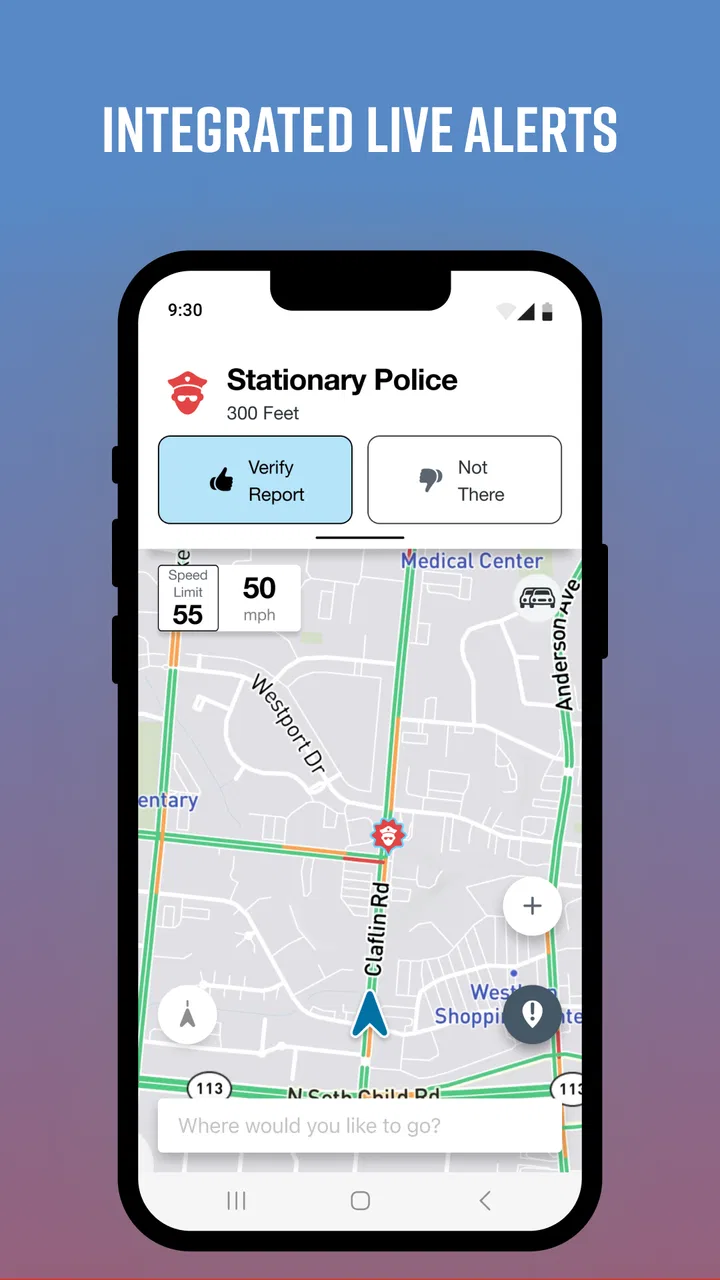
- Real-time alerts for safer driving.
- Customizable settings for user preference.
- Seamless integration with smart devices.
- Comprehensive trip history tracking.
Cons
- Requires constant GPS use
- drains battery.
- Some features locked behind a paywall.
- Occasional connectivity issues reported.
- Limited support for older device models.
- Data usage can be high without Wi-Fi.

Drive Smarter
Gallery